- Written by: admin
- September 29, 2026
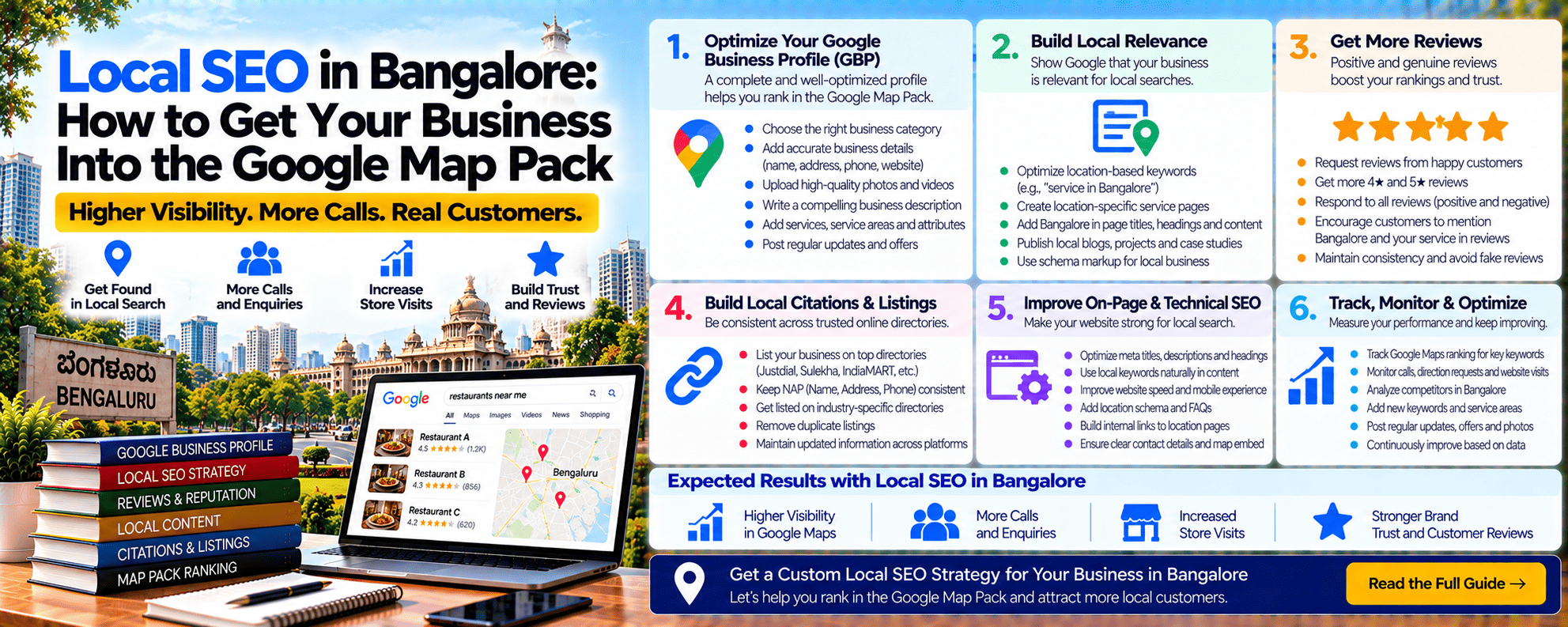
Local SEO in Bangalore: How to Get Your Business Into the Google Map Pack
Local SEO in Bangalore is the fastest way for most local businesses to get more calls, walk-ins, and enquiries. When someone searches “dentist near me,” “salon in Indiranagar,” or “pest control in JP Nagar,” Google shows a map with three businesses at the top. That’s the Map Pack, and those three businesses usually get most of the clicks, calls, and direction requests.
The good news: you don’t need a big budget to get there. You need a well-optimised Google Business Profile, genuine reviews, a website with local pages, and consistency. This guide gives you a 12-step local SEO checklist built for Bangalore businesses, plus the metrics to track your progress.
What Is the Google Map Pack?
The Map Pack (also called the Local Pack) is the box of 3 businesses shown with a map for local searches. It usually appears:
- Above normal search results
- For “near me” searches
- For searches with an area name (“cafés in HSR Layout”)
- For many service searches, even without a location
It shows each business’s rating, number of reviews, hours, and buttons to call, get directions, or visit the website.
How Google Decides Local Rankings
According to Google’s guide on improving your local ranking, local results are based mainly on three factors:
| Factor | What It Means | What You Can Do |
|---|---|---|
| Relevance | How well your profile matches the search | Right categories, services, and complete information |
| Distance | How far you are from the searcher | Accurate address and area pages (you can’t move your shop!) |
| Prominence | How well-known and trusted you are | Reviews, links, mentions, and website strength |
Bangalore reality: Because of the city’s size and traffic, distance matters a lot. A salon in Jayanagar will rarely rank in the Map Pack for someone searching in Whitefield. Focus on winning the areas within 2–5 km of your location.
12-Step Local SEO Checklist for Bangalore Businesses
Step 1: Claim and Verify Your Google Business Profile
Go to Google Business Profile and claim your business. Verification is often done by video, showing your signage, workspace, and proof of business. Without verification, your profile won’t rank properly.
Step 2: Choose the Right Categories
Your primary category is one of the most important ranking signals.
- Be specific: “Pediatric dentist” instead of just “Dentist” if that’s your focus
- Add relevant secondary categories for other services
- Check the categories your top-ranking competitors use
Step 3: Use Your Real Business Name
Use your actual business name as shown on your signboard. Adding keywords like “Best Dentist Jayanagar | Root Canal | Implants” to your name breaks Google’s guidelines for representing your business and can get your profile suspended.
Step 4: Set Up Your Address Correctly
- Storefront businesses (clinics, shops, restaurants): Show your full address with the correct pincode
- Service-area businesses (pest control, plumbers, home tutors): Hide your address and set service areas instead
- Avoid virtual offices and co-working desk addresses unless you actually operate from there with staff during business hours. These are a common cause of suspensions.
- Multiple branches: Create a separate profile for each real location
Step 5: Complete Every Section of Your Profile
- Business hours, including holidays
- Services with short descriptions and prices where possible
- Products (for shops and D2C stores)
- Business description (natural, not keyword-stuffed)
- Attributes (wheelchair accessible, women-led, free Wi-Fi, and others)
- Appointment or booking links
- WhatsApp or messaging, if available
Step 6: Add Real Photos and Videos Regularly
- Exterior (so people can find you), interior, team, products, and work
- Add 5–10 new photos every month
- Use real photos, not stock images
- Add short videos of your space or services
Step 7: Get Genuine Reviews Consistently
Reviews are one of the strongest local ranking and trust signals.
- Ask every happy customer via WhatsApp or a QR code at your counter
- Aim for a steady flow (for example, 10–30 a month) rather than a sudden burst
- Let customers mention the service and area naturally (“Great root canal treatment at their Jayanagar clinic”)
- Reply to every review, positive and negative, politely
- Never buy reviews or offer rewards for positive reviews, since this violates Google’s policies
Bad reviews hurting you? See how we help when bad reviews are killing trust.
Step 8: Post Updates Every Week
Google Business Profile posts show activity and give customers reasons to act:
- New services or products
- Offers and festival specials
- Events and workshops
- Tips and before-and-after work
Step 9: Build Local Landing Pages on Your Website
Your website supports your Map Pack ranking.
- Create a page for each area you serve (“Physiotherapy in Jayanagar,” “Physiotherapy in JP Nagar”)
- Include real local details: landmarks, directions, local projects, and area-specific reviews
- Embed a Google Map
- Add LocalBusiness schema (name, address, phone, hours, geo coordinates)
- Make sure your website’s name, address, and phone match your profile exactly
Warning: Don’t create 50 near-identical area pages with only the area name changed. That’s doorway content and can hurt you. Read our guide on SEO company red flags.
Step 10: Build Consistent Citations
Citations are listings of your business on other websites. Keep your name, address, and phone number (NAP) exactly the same across:
- Justdial and Sulekha
- IndiaMART (for B2B and suppliers)
- Practo (for doctors and clinics)
- Zomato and Swiggy (for restaurants)
- Industry directories
- Facebook, Instagram, and LinkedIn
Step 11: Earn Local Links and Mentions
Prominence grows when other local websites mention you:
- Local news websites and blogs
- Resident welfare associations and community groups
- Local event sponsorships
- Partnerships with nearby businesses
- Chambers of commerce and industry associations
Step 12: Track Your Progress
- Google Business Profile Performance: Calls, direction requests, website clicks, and search views
- Google Search Console: Clicks and rankings for local keywords
- UTM tracking: Add UTM tags to your profile’s website link so GA4 shows Maps traffic separately
Example website link on your profile:
https://yourwebsite.com/?utm_source=google&utm_medium=organic&utm_campaign=gbp- Rank checking: Search your main keywords from different nearby areas. Results change based on where the searcher is standing. Grid-based local rank trackers (usually paid) show this on a map.
Common Mistakes That Hurt Local Rankings
| Mistake | Why It Hurts |
|---|---|
| Keyword-stuffed business name | Can lead to suspension |
| Virtual office or fake address | High suspension risk |
| Wrong primary category | Google shows you for the wrong searches |
| Different phone numbers on different sites | Confuses Google and customers |
| No new reviews for months | Competitors with steady reviews overtake you |
| Ignoring negative reviews | Hurts trust and conversion |
| Wrong hours, especially on holidays | Bad customer experience and poor reviews |
| No website or a slow website | Weakens prominence |
How Long Does Local SEO Take in Bangalore?
| Competition Level | Example | Time to Map Pack |
|---|---|---|
| Low | “Tailoring shop in Basavanagudi” | 1–2 months |
| Medium | “Physiotherapy in HSR Layout” | 2–4 months |
| High | “Dentist in Koramangala,” “Interior designers in Whitefield” | 4–6+ months |
For the bigger picture, read our guide on how long SEO takes.
Metrics to Track Local SEO Success
| Metric | Where to Check | Healthy Trend |
|---|---|---|
| Map Pack position for main keywords | Manual checks / rank tracker | Top 3 within 2–5 km |
| Calls from profile | Google Business Profile | Rising monthly |
| Direction requests | Google Business Profile | Rising monthly |
| Website clicks from profile | GBP + GA4 (UTM) | Rising monthly |
| Discovery searches | Google Business Profile | Growing share of total searches |
| Google rating | Google Business Profile | 4.5+ stars |
| New reviews per month | Google Business Profile | Steady, consistent flow |
| Local organic traffic | GA4 / Search Console | Rising month on month |
Example: Salon in Indiranagar
| Metric | Before | After 5 Months |
|---|---|---|
| Map Pack position (“salon in Indiranagar”) | Not in top 10 | Top 3 |
| Google reviews | 38 | 164 |
| Calls from Google profile per month | 12 | 55 |
| Direction requests per month | 40 | 180 |
If 30% of the 55 callers book, at an average bill of ₹1,500, that’s about ₹24,750 a month from calls alone, plus walk-ins from direction requests, against a local SEO cost of ₹12,000 a month.
ROI (calls only) = (24,750 − 12,000) ÷ 12,000 × 100 = 106%, and it keeps growing as reviews build.
Illustrative example.
Local SEO and AI Search
Local SEO also helps with AI search. Google’s AI features and tools like ChatGPT and Gemini often use Google Business Profiles, reviews, and directory listings when recommending local businesses. A strong local SEO foundation improves your chances of being named in AI answers. You can track this with our free method to check brand mentions in AI.
How Beta Digital Marketing Helps With Local SEO in Bangalore
At Beta Digital Marketing, local SEO is one of our core services:
- Google Business Profile optimisation: Categories, services, photos, posts, and attributes
- Review growth strategy: Genuine review systems using WhatsApp and QR codes
- Local landing pages: Unique area pages with schema markup
- Citation building and cleanup: Consistent listings across Indian directories
- Suspension help: Fixing profile issues and guideline problems
- Monthly reports: Calls, directions, Map Pack positions, and reviews
Explore our GMB local SEO service and local SEO packages in Bangalore. Phone not ringing enough? See how we help when your phone is still silent.
We serve businesses across Bangalore, including Jayanagar and South Bangalore, Koramangala and HSR Layout, and Whitefield.
Frequently Asked Questions
What is local SEO in Bangalore?
It’s the process of improving your Google Business Profile, reviews, website, and listings so your business appears in Google Maps and local search results in Bangalore.
How do I get into the Google Map Pack?
Verify your profile, choose accurate categories, complete every section, get genuine reviews consistently, build local pages on your website, and keep your details consistent everywhere.
Why is my business not showing on Google Maps?
Common reasons include an unverified profile, wrong categories, a suspended profile, too few reviews, or strong competitors closer to the searcher.
Can I rank in areas where I don’t have an office?
In the Map Pack, it’s difficult, because distance matters. You can still rank in normal organic results with good area pages on your website.
How much does local SEO cost in Bangalore?
Most local businesses pay ₹5,000–₹20,000 a month. Our Starter plan with local SEO begins at ₹12,000 a month.
Get a Free Local SEO Audit
Not showing in the Map Pack? Get a free local SEO audit from Beta Digital Marketing. We’ll check your Google Business Profile, reviews, website, and competitors, and show you exactly what’s stopping you from ranking.
📞 +91 95139 99901 | ✉️ hello@betadigitalmarketing.com | Book your free audit →